
Name the delivered file and its destination
A deck leaves your desk in one of three shapes, and they do not fail in the same places. A live run in the meeting room depends on the machine, the display and the network. A shared link depends on the recipient’s account and on every asset being reachable from outside your workspace. An exported reading copy depends on the file: what is inside it, and what was quietly left behind.
The destination decides the checks, so write it down before the export. If the file will be read on screen, the questions are page size, small text and whether links have to open. If it will be printed, the questions move to margins, page edges and how the smallest text survives paper. If it is a reference copy for people who missed the meeting, the questions are whether the deck still makes sense without your narration and whether each figure carries its source.
The Library of Congress format description puts the exported document in a category of its own — a “final-state format for delivery to end users and long-term preservation of the document as disseminated to users” (PDF/A Family, PDF for Long-term Preservation, accessed 2026-09-14; original wording: “A final-state format for delivery to end users”). That phrase is the reason the export never replaces the editable source. The third item on the site’s published checklist is “Keep an editable source copy”, and the note recorded against it in the pass below reads “Editable source kept in the working folder.” One delivered file name, carrying a version and a date, is enough for the recipient; the working folder is what carries the history.
Run the ten-item preflight
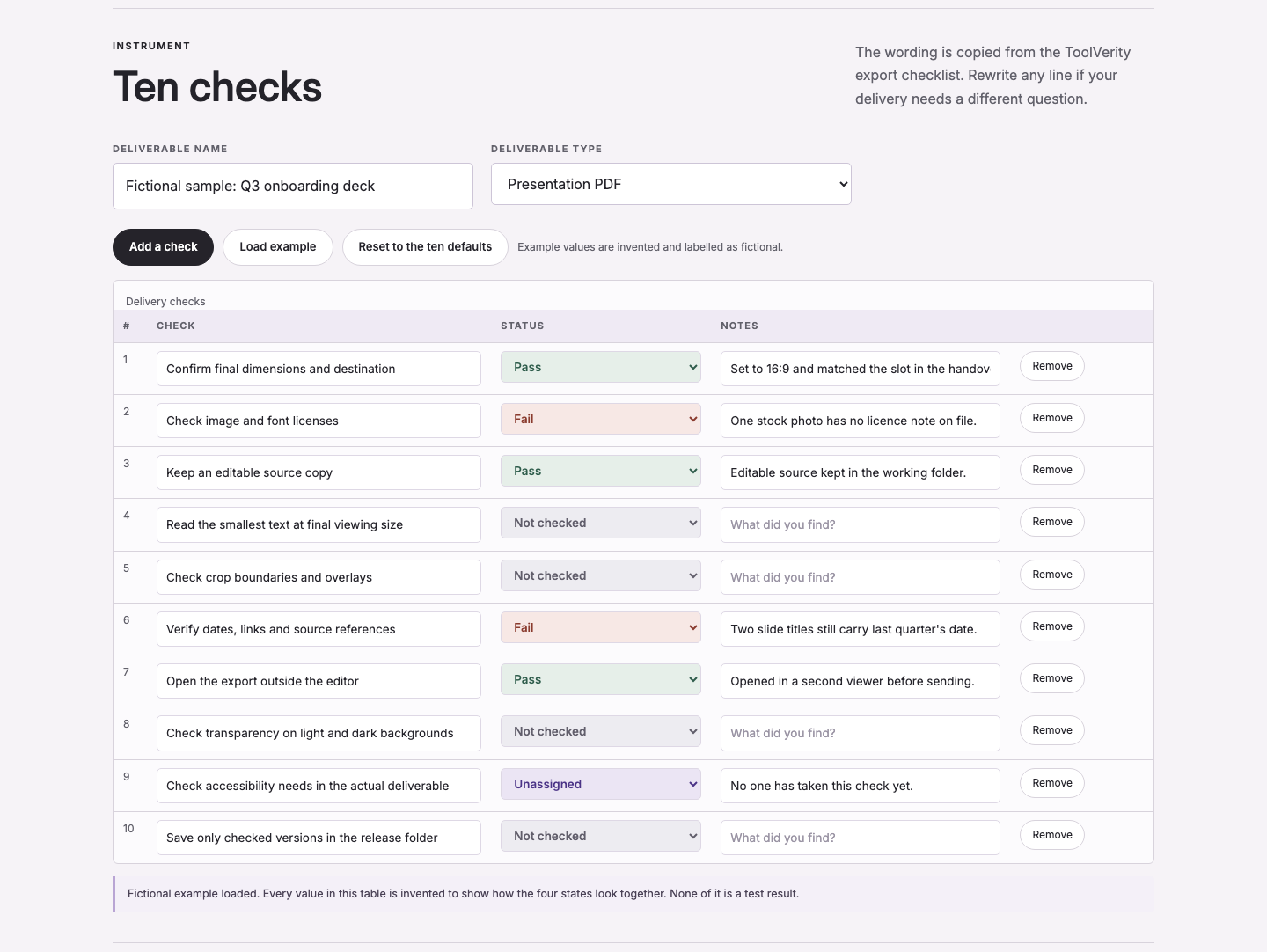
The list this site ships is a plain file of ten items, export checklist (TXT) — 13 lines and 524 bytes as it sits on disk on 14 September 2026. Ten items, no merging and no omissions, which is the property that makes a pass comparable between two deliverables: the row that was skipped last time is visible this time. Mark each item Pass, Fail, Not checked or Unassigned. Pass means the item was checked and holds. Fail means it was checked and does not hold, and the note beside it carries the finding. Not checked means nobody has compared it with the deliverable yet — the honest state for a fresh pass, and not the same thing as a pass. Unassigned means the row has no owner, which is a statement about responsibility rather than about the file.
| Check (as published) | State | Note recorded |
|---|---|---|
| Confirm final dimensions and destination | Pass | Set to 16:9 and matched the slot in the handover folder. |
| Check image and font licenses | Fail | One stock photo has no licence note on file. |
| Keep an editable source copy | Pass | Editable source kept in the working folder. |
| Read the smallest text at final viewing size | Not checked | — |
| Check crop boundaries and overlays | Not checked | — |
| Verify dates, links and source references | Fail | Two slide titles still carry last quarter’s date. |
| Open the export outside the editor | Pass | Opened in a second viewer before sending. |
| Check transparency on light and dark backgrounds | Not checked | — |
| Check accessibility needs in the actual deliverable | Unassigned | No one has taken this check yet. |
| Save only checked versions in the release folder | Not checked | — |
The runner’s own summary line for that pass reads 10 checks · Pass 3 · Fail 2 · Not checked 4 · Unassigned 1 · 6 notes. Three checks hold, two do not, four have not been looked at, one has nobody’s name on it. Read the last three numbers as the useful part: a pass with four unexamined rows is a queue, not a clearance.
Load the checklist in the preflight runner, mark each item against the exported file, and export the status sheet with the deck. Open the preflight check runner.
Check links, fonts and small text in the export
The editor preview answers a different question from the one you are asking. It shows you what the file looks like on a machine that has your fonts, your licences and your link permissions. The four cards below are the checks that come apart in the export.
01 · Links that must still open for someone else
A hyperlink is text plus an annotation, and an annotation survives export far more reliably than behaviour does. Archival PDF constrains exactly that gap: “Javascript and executable file launches are prohibited.” (PDF/A Family, accessed 2026-09-14; original wording: “Javascript and executable file launches are prohibited.”). So test the link in the exported file, signed in as the least-privileged person in the audience, and expect form logic, buttons that ran scripts and any embedded viewer to be gone rather than degraded.
02 · Fonts: embedded, or substituted without asking
The same family of standards requires that “All fonts must be embedded and also must be legally embeddable for unlimited, universal rendering” (accessed 2026-09-14; original wording as quoted). The second half of that sentence is the one that bites in a design tool: a licensed display face may be visible on your screen and not permitted to travel inside the file. What happens then is documented too: “If migration to PDF/A is done when the fonts are not available, substitute fonts must be used, and the objective of preserving the visual appearance intended by the original author cannot be guaranteed.” (accessed 2026-09-14; original wording as quoted). Inspect the export’s font list rather than trusting the page count, because a substitution changes line breaks without changing the number of pages.
03 · Small text at the size the reader will actually meet it
No pixel floor on this page is invented, so none is given. What can be measured is what the site itself renders: in the same capture that produced the screenshot above, the median glyph run inside the table band measured 13 px, consistent with the 13–16 px body scale used across these pages (assets/shots/manifest.json, 2026-09-14). The transferable habit is the checklist item itself — read the smallest text at final viewing size, at 100% zoom or on paper at the destination size, not in a zoomed preview where a footnote looks comfortable.
04 · Characters and symbols that fail to map
Font trouble is not only visual. The Library of Congress page records the failure mode found in a repository study: “Fonts which do not map to Unicode are also problematic; such fonts may be used for mathematics or to represent historical written languages.” (accessed 2026-09-14; original wording as quoted). Mathematical notation, arrows, currency and any non-Latin script are where a copied paragraph stops being searchable or extractable. Select and copy one paragraph of the exported file that contains a symbol, and paste it somewhere plain to see what arrived.
Open the export outside the editor
The handover from notes to deck is where a delivery check earns its place: the note set, the outline that became slide titles, the deck and the export are four different files, and the last one is the only one the audience sees. These are the handover items worth carrying into the delivery pass, as checks rather than as advice.
- Read the slide titles in sequence and nothing else. If the argument is not visible in that list, the deck is carrying it in the narration.
- Match each factual slide to its note or source line. A chart with no data behind it is a research task that is still open, not a finished slide.
- Delete placeholder slides before export instead of shipping them empty or half-filled.
- Carry the outline file beside the exported file, so a reviewer can compare what was said with what was delivered.
- Give the outline and the export the same version name, so the pair stays a pair.
The file-level checks come after that. Open the export in a second viewer, walk the first, middle and last pages, then every page with a table, a dense paragraph or an unusual character. Look specifically for line breaks that moved, images that were resampled, and content sitting under an overlay or outside the page edge. Note whether any asset depends on an account or an authorisation that the recipient does not have — an image that is licensed to your workspace is not licensed to the person you send the file to. Only one of the ten published checks covers this pass in the run above — “Open the export outside the editor”, marked Pass with the note “Opened in a second viewer before sending.” The other nine are the checks that happen before and after it.
Handle animation, embedded media and accessibility separately
A static PDF cannot promise interactivity, and the archival profile is explicit about why: “Audio and video content are forbidden. 3D artwork is also forbidden.” Encryption is disallowed as well, which means a password-protected archival file is a contradiction rather than a feature (PDF/A Family, accessed 2026-09-14; original wording as quoted). The stated purpose is narrower than the word “PDF” suggests: PDF/A exists to “preserve their static visual appearance over time, independent of the tools and systems used for creating, storing or rendering the files” (accessed 2026-09-14; original wording as quoted).
Some of that ground has shifted in later parts of the standard. PDF/A-4 permits script to be kept in the file, but on strict terms: “Javascript can now be preserved in the file, for example to store information about an interactive form’s values or logic, but must be stored in an embedded file stream and not executed by a confirming viewer without explicit action by a user.” (accessed 2026-09-14; original wording as quoted). For a delivery this changes nothing practical: choose the format for the audience, then deliver the interaction and the reading copy as two files rather than as one compromise.
Accessibility is the row that most often sits at Unassigned, and it is also the row most often mistaken for a pass because the file looks tidy. The distinction is documented in the same place: “a PDF/A file conforming to level A does not necessarily conform to the PDF Enhancement for Accessibility standard (PDF/UA, ISO 14289-1:2014)” and, in practice, “accessibility is most supported in PDF/UA” (accessed 2026-09-14; original wording as quoted). Tagged structure is hard to add at the end — “Full PDF/A-1a compliance, with tagged document structure, is hard to achieve except in a workflow that anticipates that objective from initial document creation” (accessed 2026-09-14; original wording as quoted). If the audience needs a screen reader or a fillable form, plan for the tagged deliverable during design and verify it in the file that ships.
Worked example: one deck, two failures
The pass behind the table in the second section is a real run of this site’s own runner, captured on 14 September 2026 at 19:00:30 CST in Chrome 152.0.7977.84 with a 1440 × 3600 headless viewport; the instrument-only crop is 1440 × 1082, 163,056 bytes, SHA-256 prefix 002dfa0b84b989a6 (assets/shots/manifest.json, 2026-09-14). The deliverable named in the run is a sample label, and the page’s own interface marks the loaded values as invented; what is being reported here is the state of the ten rows after the pass, not a claim about a client deck. Two rows failed, and the two failures are the ordinary kind rather than the exotic kind.
- Licences. “Check image and font licenses” came back Fail with the note “One stock photo has no licence note on file.” Nothing about the export settings would have caught it: the photo was embedded correctly, and the missing artefact is a sentence naming where the right to use it came from.
- Stale dates. “Verify dates, links and source references” came back Fail with the note “Two slide titles still carry last quarter’s date.” Read as titles in sequence, the deck contained two slides that contradicted the current quarter.
One row is Unassigned: “Check accessibility needs in the actual deliverable”, with the note “No one has taken this check yet.” That row is not a verdict on accessibility; it is a record that the row had an owner missing, which is the state worth seeing before a release rather than after one. Four figures a printed sheet would normally carry are missing on purpose, because no deck was exported for this page. The deck’s page count, the byte size of the resulting PDF, the number of pages that changed during fixing and the wall-clock time spent on the two repairs are each Not checked — the pass above ran against the working file, before any export existed, and inventing those numbers to complete the story would defeat the point of recording states at all.
What did carry forward is the shape of the fixes. Both failures are content repairs rather than export settings, and both leave a trace in the next pass: a licence note placed beside the file, and two slide titles corrected in the outline so that the export and the outline say the same quarter. Neither shows up in a byte count or a page count, which is exactly why the sheet has a Notes column beside every state.
Save the pass sheet with the file
The runner exports the pass as CSV under four column names — Deliverable, Check, Status, Notes — and those four names are the whole schema. The deliverable name and its type travel with the export as well, so a sheet opened months later still says which file was checked and what kind of file it was.
Keep the sheet beside the delivered file, and keep the published checklist with it, because the sheet is only readable against the list it came from. Where a row ends at Not checked, the next reader knows the difference between “checked and fine” and “nobody looked” without opening the file. Load the checklist in the preflight runner, mark each item against the exported file, and export the status sheet with the deck. Open the preflight check runner.
What a checklist cannot verify
No item on the list judges whether the deck is well designed, whether the wording is any good, or whether the chart chosen was the right chart. Those questions stay with a person. The sheet also cannot promise that a file opens identically everywhere: rendering depends on the reader, and even conformance claims are self-declared. A PDF/A file identifies itself through metadata values such as pdfaid:part and pdfaid:conformance (PDF/A Family, accessed 2026-09-14; original wording: “This schema has two mandatory elements: pdfaid:part (integer) and pdfaid:conformance (closed list of text values)”), and a file can carry those values while failing independent validation.
The scale of that gap is documented. In one study reported on the same page, “of 201 PDF/A files created by Acrobat DC, 50 failed to validate using veraPDF” (accessed 2026-09-14; original wording as quoted). A validator is a second opinion, not a guarantee, and no count of records on this site is a score or a ranking of any tool or file.
What the pass does give you is a bounded, dated statement: these ten items, against this file, on this date, with these states and these notes. That is a smaller claim than “ready to send”, and it is the one the evidence supports.
Two questions before you send
If the export opens correctly on my machine, have the fonts travelled with it?
Not necessarily. Your machine can render a licensed face from a local installation, which is exactly the situation the embedding requirement exists to prevent in a delivered file: “All fonts must be embedded and also must be legally embeddable for unlimited, universal rendering” (PDF/A Family, accessed 2026-09-14; original wording as quoted). The check that answers your question is the file’s own font list, read in a viewer other than the editor that produced it.
Should the exported PDF be the file everybody hands around next quarter?
It can be handed around; it should not be the only copy kept. The export is a final-state artefact, so version history, speaker notes and editability live in the source, while the export carries the states recorded against it. Keep both, named as a pair, and let the pass sheet and the editable outline sit beside the delivered file.
The pages this checklist was built from
Every number and quotation below was read on the page named beside it on 14 September 2026, or measured in a file produced on this machine on the same date. Nothing on this page is a product test, and no page count, byte size or repair time is stated for a deck that was never exported.
- Library of Congress, PDF/A Family, PDF for Long-term Preservation (format description fdd000318, last significant update 2024-05-08, page read 2026-09-14) (new tab): “All fonts must be embedded and also must be legally embeddable for unlimited, universal rendering.” · “Audio and video content are forbidden. 3D artwork is also forbidden.” · “Javascript and executable file launches are prohibited.” · “A final-state format for delivery to end users and long-term preservation of the document as disseminated to users.” · “of 201 PDF/A files created by Acrobat DC, 50 failed to validate using veraPDF” · standard numbering cited on the same page: PDF/A-1 as ISO 19005-1:2005, PDF/A-2 as ISO 19005-2:2011, PDF/A-3 as ISO 19005-3:2012, PDF/A-4 as ISO 19005-4:2020, PDF 2.0 as ISO 32000-2:2020, PDF/UA as ISO 14289-1:2014.
- W3C, Web Content Accessibility Guidelines (WCAG) 2.2, W3C Recommendation (page read 2026-09-14) (new tab): “WCAG 2.2 covers a wide range of recommendations for making web content more accessible” and “WCAG 2.2 success criteria are written as testable statements that are not technology-specific.”
- RFC 4180, Common Format and MIME Type for Comma-Separated Values (CSV) Files (RFC Editor, October 2005, page read 2026-09-14) (new tab): “Each record is located on a separate line, delimited by a line break (CRLF)” and “There maybe an optional header line appearing as the first line of the file with the same format as normal record lines.”
- Section508.gov, Section 508 of the Rehabilitation Act (U.S. General Services Administration, page read 2026-09-14) (new tab): “On January 18, 2017, the U.S. Access Board published a final rule updating accessibility requirements for information and communication technology (ICT) covered by Section 508 of the Rehabilitation Act and Section 255 of the Communications Act” and “ensure that covered ICT is accessible to, and usable by, individuals with disabilities.”
- MDN Web Docs, Image file type and format guide (page read 2026-09-14) (new tab): “we’ll cover the image file types generally supported by web browsers” and “provide insights that will help you select the most appropriate formats to use for your site’s imagery.”
- Site files measured on this machine, 14 September 2026: export checklist (TXT) — 10 items, 13 lines, 524 bytes;
assets/shots/manifest.json— capture record for the screenshot on this page (Chrome 152.0.7977.84 headless, viewport 1440 × 3600, captured 2026-09-14 19:00:30 CST, crop 1440 × 1082, 163,056 bytes, SHA-256 prefix002dfa0b84b989a6) and the recorded counts10 checks · Pass 3 · Fail 2 · Not checked 4 · Unassigned 1 · 6 notes. - Not checked: no deck was exported for this page, so the page count, PDF byte size and repair time of a final deck are absent rather than estimated. A publisher support page for presentation-to-PDF export options returned HTTP 404 when it was opened on 2026-09-14 and no figure from it is used here; no figure from the Otter or Adobe Express help domains is used either.