
Why short summaries lose conditions first
A summary is not a shorter version of a document. It is a set of claims about one, and the shortest claims are the ones most likely to drop the words that limited them. The damage is invisible from inside the draft, because the sentence with the missing condition reads better than the sentence it came from. Three drifts account for most of it, and all three can be reproduced from pages that were public on 14 September 2026.
A condition disappears. The Claude file-upload help page carries two different limits for the same file type in two consecutive sentences: "Claude analyzes both text and visual elements (like images, charts, and graphics) in PDFs of 100 pages or fewer. For PDFs from 101 to 1000 pages, Claude processes text only and doesn't analyze visual elements." (Upload files to Claude, accessed 2026-09-14; original wording: "in PDFs of 100 pages or fewer. For PDFs from 101 to 1000 pages, Claude processes text only"). A draft that says "Claude reads charts and images in PDFs up to 1000 pages" keeps every number and loses the boundary between them. The figures were copied correctly and the claim is still wrong.
A recommendation becomes a requirement. The same vendor's model page opens with advice rather than a rule: "If you're unsure which model to use, start with Claude Opus 5 for most workloads." (Models overview, accessed 2026-09-14; original wording: "If you're unsure which model to use, start with Claude Opus 5 for most workloads."). Compress that to "Claude Opus 5 is required for most workloads" and a suggestion has become an instruction a reader may hire against.
A ceiling becomes a fixed figure. The privacy centre describes how long a feedback report is kept: the whole related conversation goes into "our secured back-end for up to 5 years" (Is my data used for model training?, accessed 2026-09-14; original wording: "for up to 5 years"). "Up to five years" is a maximum; "feedback is kept for five years" is a term. Two words move and the sentence changes what a reader can rely on.
None of the three is caught by re-reading the summary for fluency. They are caught by reading the draft against the source, one claim at a time, which is the rest of this guide.
Set the source and the draft side by side
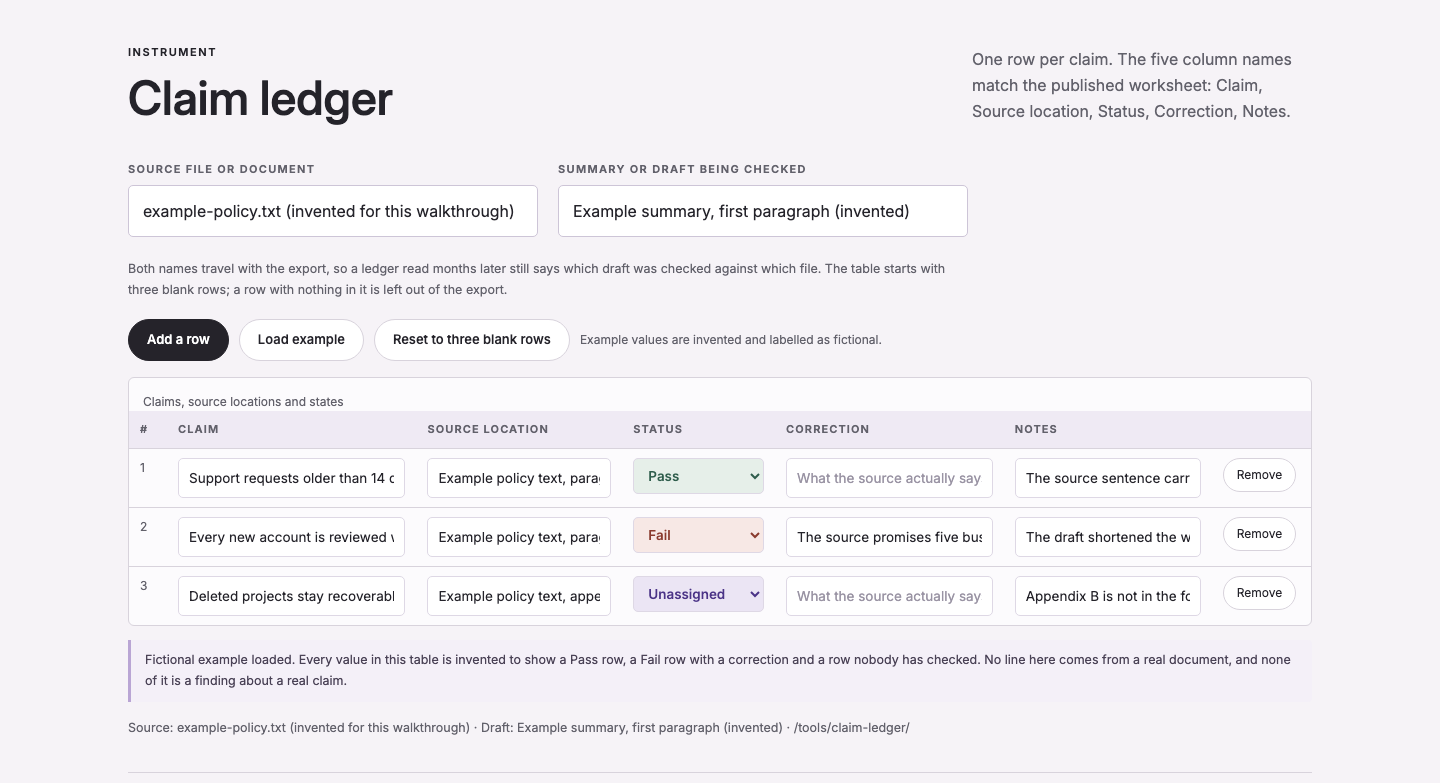
Work with the source and the draft visible at the same time. Switching tabs to check a number and then switching back is where the check quietly stops happening, because the second and third claims cost more effort than the first. The claim ledger on this site is the record half of that layout: you type the source name, the draft name and one row per claim, and the page draws the table. The tool page is explicit that the text stays where you put it: "Nothing is uploaded. There is no file picker and no address book." (Claim and source ledger, accessed 2026-09-14; original wording: "Nothing is uploaded.").
Whether you may paste a document is a different question from whether pasting it helps. Three checks come first: does the material belong to you, or to an employer with a written rule about it; does it contain personal data about people who did not agree to the paste; and is the group of people who will eventually read the draft the same group you are working from. A vendor's data policy answers only the fourth question, which is whether the vendor trains on your input. For the commercial Claude products the privacy centre states: "By default, we will not use your inputs or outputs from our commercial products (e.g. Claude for Work, Anthropic API, Claude Gov, etc.) to train our models." (accessed 2026-09-14; original wording: "By default, we will not use your inputs or outputs from our commercial products ... to train our models."). That is a statement about training. It is not permission from anyone to send client material to anyone.
One figure that would normally sit in this section is missing on purpose. The ChatGPT file-upload help article at help.openai.com returned HTTP 403 when this page was prepared on 2026-09-14, so no text could be read from it and no ChatGPT upload limit is stated anywhere on this page. It is recorded as Not checked rather than guessed from an older copy.
Split the summary into checkable claims
Write one row per claim, in the draft's own words so that a reader can find the sentence again. A sentence carrying two assertions becomes two rows, even when the two assertions are joined by "and". Names, numbers, units and currencies get their own rows even when several of them sit in one sentence, because a row with three numbers in it fails as a whole and tells you nothing about which number moved.
An invented sentence shows the split: "The pilot may start on 18 June if the security review is complete and the budget ceiling is $8,000." That is three rows, not one. The first is the date with its modal verb: the pilot may start on 18 June. The second is the condition: the start depends on the security review being complete. The third is the amount: the budget ceiling is $8,000. Written as a single row, the sentence can only be marked Pass or Fail as a lump, and the usual outcome is that a reader notices the date is right and passes the condition along with it.
Type the location in the same pass rather than afterwards. A location is a file name plus a section, page or paragraph: "Gmail Help, Send attachments with your confidential mode section" can be re-opened by someone else, while "the Gmail page" cannot. The ledger only insists on two fields before it will export (a claim and a location) for the reason the tool states: a claim with no location cannot be re-checked, and a location with no claim cannot be read.
Paste the source paragraph and the draft into the claim ledger, mark each row, then export the table before the summary goes anywhere.
Mark each claim Pass, Fail or Not checked
The ledger keeps one verdict per row, and there are three verdicts:
- Pass: the line in the source was found and the claim matches it.
- Fail: the line was found and the claim does not match it. The Correction field holds what the source actually says, quoted or closely paraphrased.
- Not checked: nobody has compared this row with the source yet. Every new row starts here, and it is also the honest state when a section of the source has not arrived.
The grid additionally offers Unassigned for a row that nobody has taken responsibility for. That records ownership of the row, not a fourth verdict on the claim, and the two are worth keeping apart: a row can be Unassigned and still end up Not checked for days, because there is no owner to check it.
A claim that is half right is the awkward case, and there are two clean ways out. Split it into two rows, one Pass and one Fail, or keep one row and mark it Fail with a correction that states the half that holds. What does not work is marking it Pass because the direction was right: the whole point of the row is that the next reader can act on it without re-reading the source. There is no score, percentage or rating anywhere in the ledger: a table of twelve rows with three Fails, six Passes and three Not checked says exactly that and nothing more.
Worked example: the conditional start that became a date
The example starts from a page anyone can open today. The source sentences are quoted exactly as the page carries them. The two summary drafts below are invented for this walkthrough and are labelled as invented wherever they appear; they are not the output of a model run, because the point of the section is the comparison, not the generator.
Source (Gmail Help). Inside the section on confidential mode the page tells you: "Set an expiration date and passcode. These settings impact both the message text and any attachments." Two paragraphs earlier the same section narrows who can use the feature at all: "If you're using Gmail with a work or school account, contact your admin to make sure you can use confidential mode." (Send attachments with your Gmail message, accessed 2026-09-14; original wording: "These settings impact both the message text and any attachments.").
Draft, invented. "Gmail deletes the attachment on the expiration date you set."
Three things went wrong at once. The condition disappeared: the sentence only exists while confidential mode is on, and on a work or school account only when an administrator has enabled it. The scope broadened: the source says the settings affect the message text and the attachments, not that an attachment is deleted on a date. And the date itself was invented, because the source names no date at all: it tells you to set one.
Corrected, also invented. "In confidential mode you can set an expiration date and a passcode; those settings apply to the message text and to the attachments. On a work or school account the feature is available when an administrator has enabled it."
The three rows the ledger holds for this pass:
| Claim | Source location | Status | Correction | Notes |
|---|---|---|---|---|
| Gmail deletes the attachment on the expiration date you set. | Gmail Help, Send attachments with your Gmail message: confidential mode section | Fail | Source says the expiration date and passcode "impact both the message text and any attachments"; it does not say the attachment is deleted on that date. | Invented draft sentence. Date invented; condition dropped. |
| Confidential mode is available in every Gmail account. | Gmail Help, same section | Fail | "If you're using Gmail with a work or school account, contact your admin to make sure you can use confidential mode." | Condition on account type dropped in the draft. |
| Confidential mode lets you set an expiration date and a passcode. | Gmail Help, same section | Pass | (none) | Quote matches the page. |
That table is what the ledger exports as CSV. The header is the same five names the published worksheet uses, in the same order:
Claim,Source location,Status,Correction,Notes
Two rows are marked Fail and one is Pass, and the file says which draft was checked against which source because both names travel with the export. Nothing in the file says whether the draft was good, only what moved.
Check citations, paywalls and repeated claims
A citation is not a check. Ask three separate questions of every reference the draft carries. Does the source exist at the link given. Can you inspect the passage that is being cited. And does that passage support the sentence it is attached to. A page can be real, live and correctly linked while the claim resting on it is wrong, which is what makes the second and third questions the ones worth the time.
Record enough to find the passage again: title, publishing organisation, publication date, URL, and a page, section or paragraph. Where the source changes over time, note the date you read it as well. Search for a distinctive phrase from the source rather than trusting a page number that came out of a draft, because generated page numbers are common and cheap to check.
When a reference cannot be found, look for a misspelled title or an old URL before doing anything else, and then decide. Either drop the citation and re-examine the claim, or mark the row Not checked and say so. Substituting a vaguely related page keeps a reference list looking complete and removes the one signal that something is unverified. When the only relevant source sits behind a paywall, the row should record the access limitation in the Notes field; an abstract may support a narrow statement about what a study is about, and it cannot support a number you were never able to read.
A statistic repeated across several sites is not several confirmations. Follow the number back to the dataset, the report or the documented calculation that first produced it, and if that original cannot be located, the claim goes into the ledger as Not checked no matter how many pages repeat it.
Record the correction, not only the status
A Fail with an empty Correction field tells the next reader that something is wrong and leaves them to find out what. Write the correction as the source puts it, or as close a paraphrase as the row allows, so that the sentence in the Correction field can be copied straight into the revised draft. That is what turns the ledger from a list of problems into a source of fixes.
Keep the notes column for what is still open: a section of the source that has not arrived, a figure nobody has confirmed, a decision you made while reading. The ledger does not check that a correction is right. It stores what you say the source contains and cannot tell a real quotation from an invented one, so the note is where a later reader finds out whether the row was a finding or a placeholder.
Export the table before the summary goes anywhere, and keep the file name of the source beside it. The CSV keeps the five column names in the order the published worksheet uses, the two names at the top of the page travel with the export, and a ledger read months later still says which draft was checked against which document. Rows that are still completely blank are left out of the file rather than exported as empty lines.
Build the ledger in the claim ledger tool and export it as CSV before the summary leaves your drafts folder.
Read the source once more without the draft
The per-claim pass cannot find something that is missing altogether, because a sentence that was never written leaves no row. Do a second pass in the other order: put the draft away, read the source, and write down the three things a reader must not miss. Then compare that list with the draft. In practice the omissions cluster around scope, effective dates and the difference between a proposal and a decision, which are exactly the things a short summary has no room for.
Two structural limits are worth checking before the text is even drafted. A summary can only be as accurate as the text the tool managed to read, and reading is not universal: the Claude file-upload help page notes that for non-PDF documents the service "extracts text only from these files. If they contain embedded images, Claude won't be able to read or interpret them." (accessed 2026-09-14; original wording: "Claude extracts text only from these files"). A summary of a scanned table or a chart is therefore a claim about an image, and it belongs in the ledger as Not checked until someone opens the image and reads it. The second limit is length: chat uploads accept "Up to 20 files per chat" and PDFs "are limited to 1000 pages" (Upload files to Claude, accessed 2026-09-14; original wording: "Number of pages: PDFs are limited to 1000 pages"), so a document that arrives in pieces has to be re-assembled as a claim list rather than pasted whole and assumed complete.
When the second pass is done, the two passes disagree in one direction only: the claim pass finds things the draft added, and the omission pass finds things the draft lost. Both results go into the same ledger, and the ledger goes out with the summary.
Pages opened while checking this guide
Each limit and quotation below was read on the page named next to it on 14 September 2026. No software was installed or run for this page, and no performance figure is claimed anywhere on it.
- Upload files to Claude: supported types, file limits and PDF processing (new tab) (accessed 2026-09-14; original wording: "File size: 500MB per file" · "Number of files: Up to 20 files per chat" · "Number of pages: PDFs are limited to 1000 pages")
- Models overview: context window, maximum output and per-token pricing (new tab) (accessed 2026-09-14; original wording: "Context window 1M tokens" · "Max output 128K tokens")
- Is my data used for model training?: commercial-product default and feedback retention (new tab) (accessed 2026-09-14; original wording: "By default, we will not use your inputs or outputs from our commercial products ... to train our models." · "for up to 5 years")
- Send attachments with your Gmail message: attachment limit and confidential mode (new tab) (accessed 2026-09-14; original wording: "For personal Gmail accounts, the limit is 25 MB." · "These settings impact both the message text and any attachments.")
- Not checked: ChatGPT file uploads FAQ (new tab), the page returned HTTP 403 on 2026-09-14 and no figure from it is used here.