
Stage 1 · Record with permission and a purpose
Three things are settled before anything is captured: who is in the room, what the recording is for, and how long it will be kept. State all three out loud at the start of the call so that the transcript itself contains the notice, and so that anyone who joins late hears it. A recording with no stated purpose is the item most likely to be unreviewable six months later, because nobody can say whether the people in it expected it to exist.
Consent rules are jurisdiction-specific and this page does not summarise them. The pages that would carry the statutory detail were not retrievable during this pass, so the register marks that row Not checked rather than paraphrasing law from memory. What the workflow fixes is the procedural part: the purpose is written down before recording starts, the destination is named, and any participant who cannot agree to it means the meeting is not recorded.
Where the organisation has its own policy, that policy is the binding version and the note here is only a checklist.
Pick one capture route for the first cycle and finish the whole loop with it: record, transcribe, label, register, hand off. Running the loop once end to end on a small meeting surfaces the disagreements between tools before they are built into habit. Adding a second system before the first loop is closed usually means two half-reviewed transcript sets and no register. Close this stage by writing the retention line into the same note as the purpose: which recording is deleted when, and who is responsible for deleting it. An unclosed retention line turns stage 3's untouched reference copy into a permanent archive by accident.
Stage 2 · Produce a transcript you can correct
Make a short test recording in the room or the call client that will actually be used, then listen back on headphones before the real meeting. Two things are being checked: whether quiet participants can be heard at all, and whether the transcription service handles the names and acronyms this team uses. A test that is run on a different device from the meeting device answers neither question.
Name the file before you upload it, with a pattern that survives being emailed around: project, date, and a suffix marking it as a test or a final. Keep the original audio and the first export untouched while the review is open, because the register in stage 4 will be checked against them, not against a later, tidied version of the transcript.
The plan you hold decides whether the first real meeting fits in one file. The Otter pricing page lists the free tier with “300 monthly transcription minutes”, and its Pro tier with “Up to 90 mins /meeting” and “1200 in-app recording minutes”. Fireflies lists a free tier with “Unlimited transcription*”, “400 mins of storage/team” and “20 AI credits”, where the asterisk attaches conditions to the word unlimited. Both readings were taken on 14 September 2026, and both change without notice: read the limits on the day you run the first loop, and record the limit you observed in the same note as the file name. A meeting that exceeds a per-conversation cap produces a second file, which is exactly the case where an unrecorded split later reads as a gap in the transcript.
Write the proper-noun list for this meeting before the review: participant names, project names, numbers that get spoken aloud. It is the cheapest correction aid in the workflow, and it is the one that makes stage 5's sample listening pass quick rather than archaeological.
Stage 3 · Fix speaker labels before quoting
Keep the first export of the transcript exactly as the service produced it, with its own speaker labels, and do the correction work on a copy. The untouched file is the reference for stage 5; a label you corrected is a claim about who spoke, and the claim has to be checkable against something that has not been edited.
Anchor each label to evidence inside the transcript rather than to your memory of the call: a participant saying their own name, a chair addressing someone by name, a handover sentence that names both speakers. Where the evidence is not there, write Unidentified speaker with the timestamp and leave the row unresolved. Guessing a name is worse than leaving the gap, because the guess is indistinguishable from a confirmed label once the transcript is exported.
Before applying a rename, check whether it affects one exchange or every occurrence of that label in the file. A rename applied to all occurrences can move a question into the other speaker's mouth, which changes what the meeting appears to have decided: the single most damaging edit this stage can make. After the export, search the corrected file for the old label and re-listen to the places a rename usually breaks: handovers, interruptions, and answers that are two words long.
Label changes belong in the change record, not only in the file: which label changed, at which timestamps, and what the evidence was. When the register in stage 4 cites a timestamp, a reader who disagrees about a speaker needs that record to see whether the disagreement is about the wording or about who said it.
Stage 4 · Register decisions and action items
Decisions and action items are two lists, not one. A decision is a statement the group settled; an action item is work that somebody has to close. Mixing them produces a register where the same row means “agreed” in one place and “to do” in another, and the counts at stage 5 stop meaning anything.
Each action item carries four fields before it counts as written: the deliverable as a noun phrase, the owner, the due date, and the source timestamp it came from. A row with no owner is labelled Unassigned rather than assigned by seniority or by guesswork, and a row with no stated date stays undated instead of receiving an estimated one. Unassigned and undated rows are filterable precisely because they are labelled. A row that says “someone should look at this” hides both problems behind a sentence.
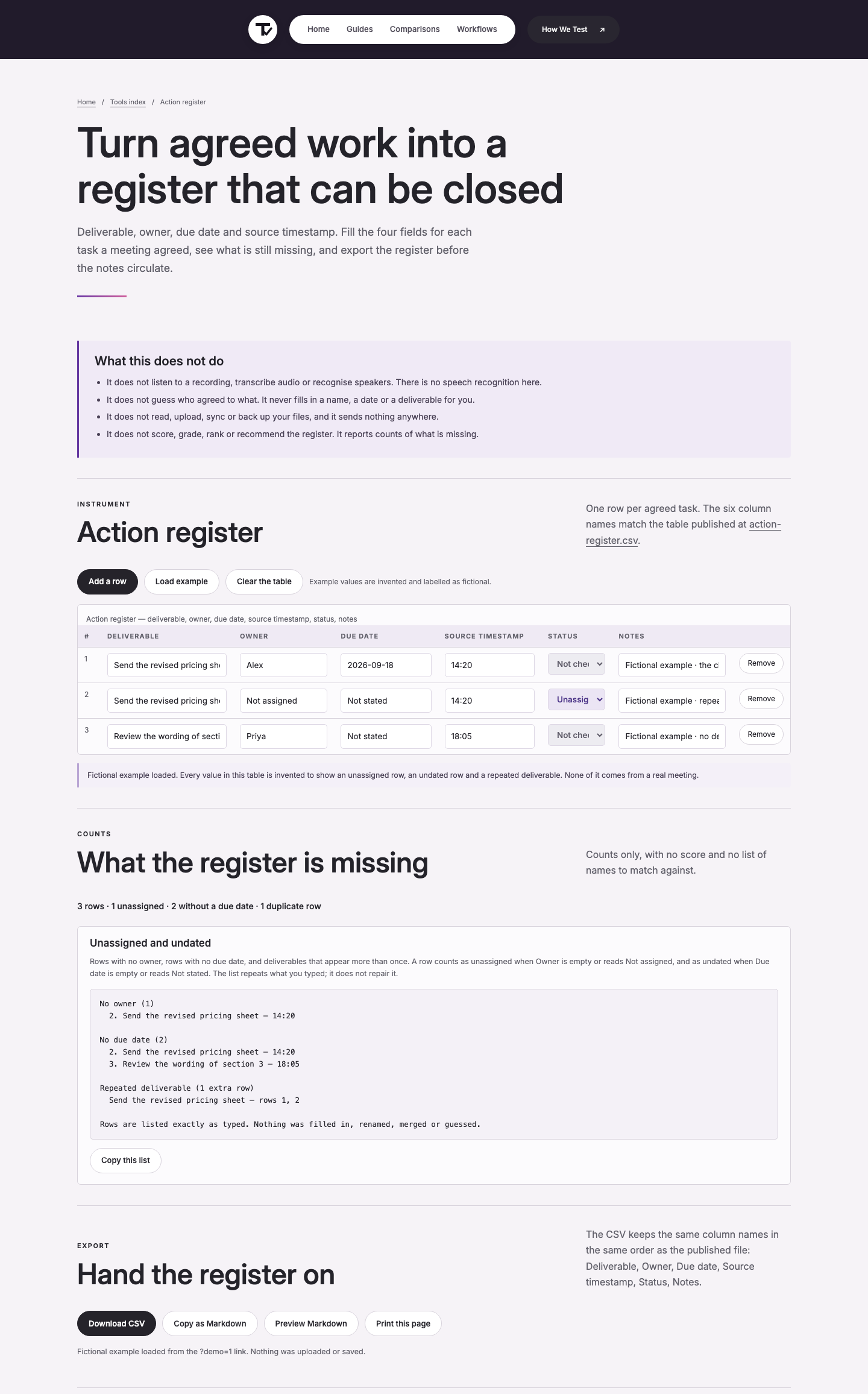
The action register holds the same six columns as the published file: Deliverable, Owner, Due date, Source timestamp, Status, Notes.
The example set captured on 14 September 2026 contains three rows, one of them unassigned, two without a due date, and one repeated deliverable. The same wording appears in two rows at timestamp 14:20, and the count line reports it as “Repeated deliverable (1 extra row)”. That duplicate is the failure this stage is most likely to ship unnoticed: the same task tracked twice looks like two commitments, and both look closed only when one of them is.
The Source timestamp column is what keeps the register checkable. A due date without a timestamp is a claim about the future that nobody can trace; with the timestamp, a reviewer can hear the conditional clause that the date depends on and decide whether the row was written correctly in the first place.
Stage 5 · Check the register against the recording
Read the register back against the recording before anything is circulated. Sample three places rather than reviewing everything: the first action item raised, the middle of the meeting, and the last exchange before the close. Then work across the rows and check the three things that go wrong: a date that was spoken as a condition, an owner who was named as a suggestion rather than as an acceptance, and a scope word (“the pricing sheet”, “section 3”) that vanished in the summary.
The count line is the review artefact. In the example, “3 rows · 1 unassigned · 2 without a due date · 1 duplicate row” says that a quarter of the work below is not assignable as written and that one task exists twice. None of that is visible from reading the rows in order, and all of it is visible in the counts. A row is marked Pass only after the corresponding audio has been heard; rows that were not listened to stay Not checked.
Two failures recur often enough to be worth naming. A conditional deadline (“aim for Monday once procurement confirms”) is not a Monday deadline, and the register keeps the dependency and the request for confirmation rather than the date alone. A proposal that was discussed but not decided belongs in the decisions list as an open question, not as an action item with an owner, or the owner will be blamed for work the meeting never agreed to. Keep the findings in the register itself, in the Notes column, rather than in a separate email. Notes travel with the exported file; an email about the file does not.
Stage 6 · Hand off the pack
The pack has four parts: the corrected transcript or a trimmed version of it, the exported register, the open-question list, and the access rules. Trim the transcript by removing what nobody will re-read, and keep the timestamped source lines that the register cites: a trimmed transcript that drops the timestamps makes every row unverifiable.
Test the handover with one page before sending the pack on. Import a single page of the register into whatever the receiver will use, and check what happened to the date format, the commas inside Notes, and the owner field. The CSV format's own specification makes the comma case explicit: fields containing commas, double quotes or line breaks have to be enclosed in double quotes, which the RFC 4180 text states as “Fields containing line breaks (CRLF), double quotes, and commas should be enclosed in double-quotes.”
An import that silently splits a Notes field into two columns is a data loss that surfaces weeks later.
Name the files as a set so they cannot be separated in a mail thread: one prefix, one date, and a suffix that says what each file is. Record who can open the recording as opposed to the register. Those two audiences are often different, and a register that links to a recording the receiver cannot access is a dead end rather than a handoff.
Stage 7 · Revisit what is unassigned or overdue
The register's Unassigned and undated panel is the follow-up list, and it is read on a schedule rather than when someone remembers. Unassigned rows need a person, which means a decision; undated rows need either a date from the owner or an explicit note that the task is open-ended. Neither problem is solved by re-sending the whole register.
When a due date is revised, the change is recorded as an update with its own date and reason, never by editing the historical row. The register is a record of what was agreed and when; silently changing 18 September to 25 September destroys the only evidence that the first date existed. Keep timestamps in one format throughout so the register sorts correctly: the Internet timestamp profile in RFC 3339 exists for exactly this reason, defining “a date and time format for use in Internet protocols that is a profile of the ISO 8601 standard for representation of dates and times using the Gregorian calendar.”
Retire the recording on the retention date written in stage 1, and note the deletion in the same file as the pack. A register that outlives its source audio is still usable (the timestamps and the decisions stand on their own) but the next reviewer should know that stage 5 cannot be re-run for that meeting.
What this workflow does not automate
Nothing in these seven stages sends a message, edits a date, or assigns a person. Those are three decisions with three different owners, and the register is deliberately the last place they are written rather than the first place they are executed. Delivery of the pack, and any notification that follows it, remains an action taken by a person who can see the whole register. The workflow also makes no judgement about anyone's performance. The counts it produces describe rows (unassigned, undated, duplicated) and a row that is unassigned is a statement about the meeting, not about the people in it. Where a recording contains sensitive material, the organisational policy decides who may read the transcript, and this process does not override it.
Provider pages read for this workflow
The plan limits and pricing lines below were read on the provider pages on 14 September 2026, and the register figures come from the example set captured in this site's own action register on the same date. Prices and limits change; the accessed date is part of the record for that reason.
- Otter.ai, pricing and plans (accessed 2026-09-14, source text: “300 monthly transcription minutes” on the free tier, and “$16.99 /user/month” with “Up to 90 mins /meeting” and “1200 in-app recording minutes” on the next tier up)
- Fireflies.ai, pricing and plans (accessed 2026-09-14, source text: “$0 Free forever”, “Unlimited transcription*”, “400 mins of storage/team”, “20 AI credits”)
- IETF, RFC 3339: Date and Time on the Internet: Timestamps (accessed 2026-09-14, source text: “This document defines a date and time format for use in Internet protocols that is a profile of the ISO 8601 standard for representation of dates and times using the Gregorian calendar.”)
- IETF, RFC 4180: Common Format and MIME Type for CSV Files (accessed 2026-09-14, source text: “Fields containing line breaks (CRLF), double quotes, and commas should be enclosed in double-quotes.”)
Method: the register shown in the figure is the example set in this site's action register, captured on 14 September 2026 with the count line “3 rows · 1 unassigned · 2 without a due date · 1 duplicate row”. The four columns named in stage 4 are those published in the tool's own column list: Deliverable, Owner, Due date, Source timestamp, Status, Notes.
Not checked in this pass: the jurisdiction-specific rules on recording a meeting were not read on an official source page, so stage 1 states the procedural rule only and marks the legal row Not checked. No live end-to-end import test into a third-party task system was run for this page; the CSV quoting rule is cited from the format's own specification.