
Start with the decision list, not the transcript
Write the claims down before you listen. Take the summary you were sent, or the notes you drafted, and reduce each sentence to one line: what was decided, what was proposed, and what was left open. A meeting record behaves like a set of claims about a conversation, and the only test that matters is whether the recording carries each claim. Doing this first changes what you hear. If you start at the transcript, you read until something feels wrong. If you start at the list, you are hunting for a known sentence in a known place: and the list also shows you which claims have no location at all.
This page runs one record through the whole check: permission and a test recording before the call, speaker labels over the audio, the four fields of every action, and the export that leaves your desk. The worked example in the middle is the invented meeting that ships inside the action register tool. It stays labelled as invented, so every count on this page can be produced again from a browser.
Before the meeting: permission, purpose and a test recording
Recording consent is local law plus local policy, and the two do not always agree. California's Penal Code section 632(a) prohibits recording a confidential communication "intentionally and without the consent of all parties" (California Legislative Information, accessed 2026-09-14, source text: "intentionally and without the consent of all parties to a confidential communication, uses an electronic amplifying or recording device to eavesdrop upon or record the confidential communication"). Other jurisdictions let one participant consent. Your organisation may separately restrict which service is allowed to receive the audio. A meeting bot appearing in the participant list is not the conversation that permission requires.
Then make a short test recording with the room, the microphones and the meeting software you will actually use. Play it back through headphones and listen for the quiet participants rather than the loud ones. Check for clipping and for keyboard noise. If each person records a separate track, keep those tracks: one mixed file cannot be split reliably later, and a split that exists only inside someone's memory cannot be recovered at all.
Name the file so the next person can place it without asking you. checkin_2026-09-14_test carries the project, the date and the fact that it is a test. Before a long call, compare the file type and the expected length against the limit on your plan. Otter's public pricing page lists 300 monthly transcription minutes and 3 lifetime audio/video file imports on the free plan, and 1,200 in-app recording minutes with 10 monthly audio/video file imports on Pro at $16.99 per user per month (Otter pricing, accessed 2026-09-14, source text: "1200 in-app recording minutes", "10 monthly audio/video file imports", "$16.99 /user/month"). Fireflies lists 400 minutes of storage per team on its free plan and 8,000 minutes of storage per seat on Pro, billed annually at $10 per seat per month (Fireflies pricing, accessed 2026-09-14, source text: "400 mins of storage/team", "8,000 mins of storage/seat").
A limit you hit at minute 41 of a 45-minute call is a limit you cannot repair afterwards.
Keep a short list of names, product terms and acronyms beside you. It tells the service what to expect. It does not prove the service heard it correctly, so the list is an input to the review pass, never a substitute for it.
Anchor speaker labels to evidence
Keep one untouched copy of the recording and the first export. Speaker corrections should stay auditable, because an action item inherits its owner from the label printed above the sentence.
Anchor a voice to evidence instead of to the participant list. Look for a moment where someone says their own name, or where the chair addresses a person by name, then listen to enough surrounding audio to be sure which voice that is. If the identity stays uncertain, write "Unidentified speaker" and the timestamp. A plausible name typed into a transcript is worse than a visible gap: the gap is still visible on the next pass, and the name is not.
Before you accept a rename, check what the change covers. Some tools rename one segment; some rename every occurrence of that label. If two people were merged under a single generated label, a bulk rename spreads one person's words across the other person's record. Fix the boundary first, then the name. After exporting, search the corrected transcript for the old label and listen around handoffs, interruptions and short replies, where two voices are most often confused. If you check only one line, check the line that creates a commitment. That is the line an owner will later be held to.
Turn what was agreed into four-field actions
Read the transcript with the register open and give each agreed task its own row. Four fields, each of which survives a change of reader: the deliverable, the owner, the due date and the source timestamp. A row that says "follow up on the quote" can only be closed by the person who was in the room. A row that says "Send the revised pricing sheet, Alex, 2026-09-18, 14:20" can be closed by a stranger.
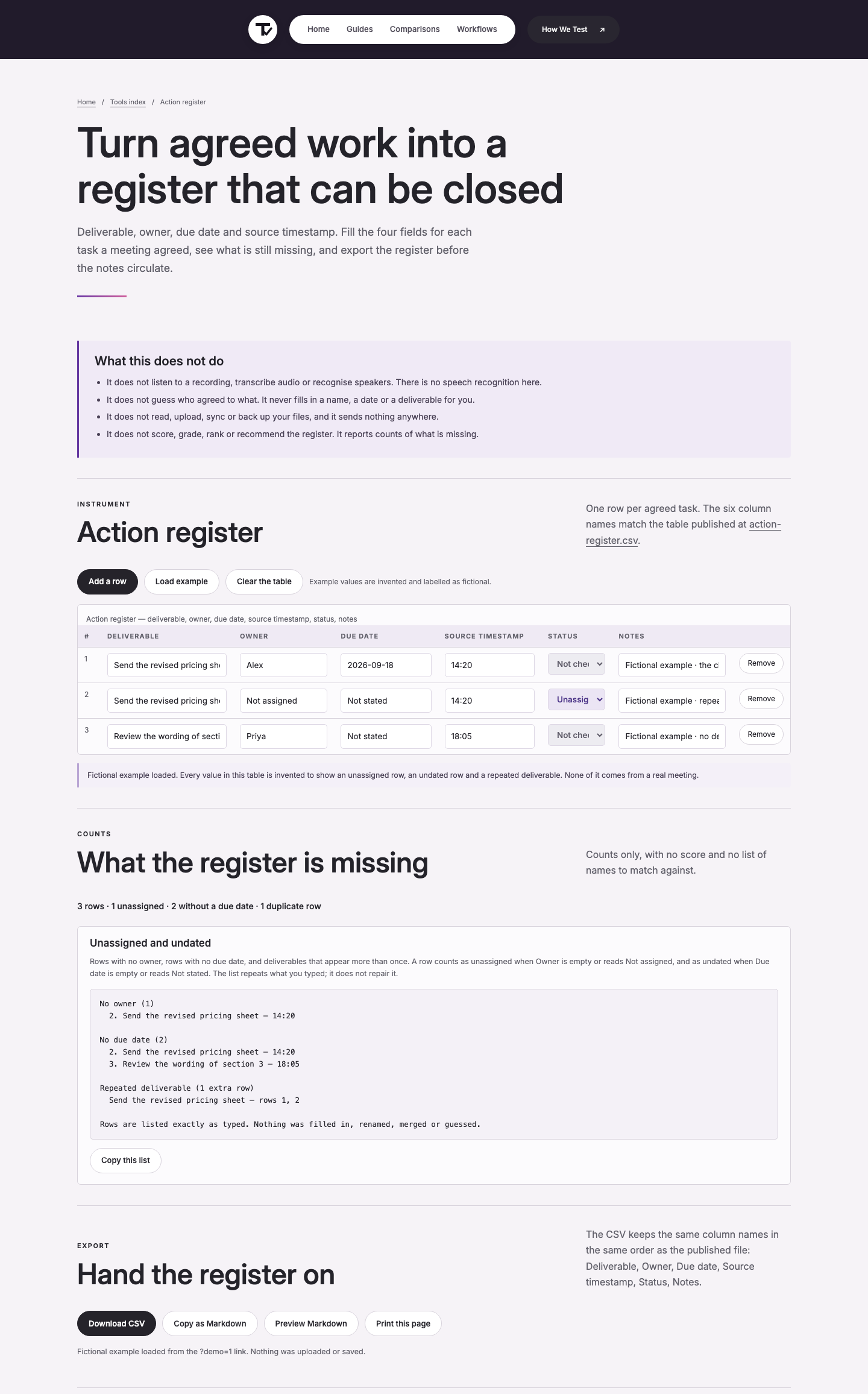
When the meeting named nobody, write Not assigned. When it named no date, write Not stated. Both words are more useful than a blank cell, because both can be filtered and both stay visible in the export. Build the rows in the action register tool while you read, so the timestamp stays attached to the sentence that produced the row. The tool keeps the four fields in one table and reports what is still missing; it does not fill anything in for you.
Check dates, owners and scope
Three things look like a date and are not. "Friday" is a date only once you know which Friday and in which time zone. "Next week" is an estimate. "Already sent" describes the past, which is a fact rather than a task. Convert only the first kind, and only with the meeting date in front of you.
Keep the limits with the task. If the decision was "send the sheet once legal clears the wording", then the legal clearance belongs in that row's Notes field, not in a separate topic that someone rediscovers next month. A condition that is dropped from the register is a condition that disappears from the project. Owners are names wherever the meeting gives a name. A team name cannot close a row, because nobody in particular is answerable. If two people were named and neither accepted, write both names and the timestamp, and leave the row Not checked until one of them confirms.
Two decisions and one unassigned task
The transcript below is invented, and so is every value taken from it. It is the example the action register tool loads when you press Load example, extended with the one line the summariser dropped. The tool prints its own label for it: "Fictional example loaded. Every value in this table is invented to show an unassigned row, an undated row and a repeated deliverable. None of it comes from a real meeting.": and this page keeps that label on the numbers.
The draft note written from that recording said: "Agreed to proceed. Pricing sheet to be sent. Section 3 wording to be reviewed." Read against the decisions, it had already lost two things. The date had become a direction of travel with no calendar day, and the legal clause had gone entirely, because nobody in the room had been named to do it.
The check restored the date, kept the condition on section 3, and recorded the legal clause as an unassigned row instead of quietly dropping it. The register we ended with is the export below: three rows, 419 bytes, in the same six columns as the site's own register file.
Export produced by the tool's own CSV writer, run over those three rows: 419 bytes, SHA-256 9d09d71eb46d22fbbdb6fae011453e3f01220f0e9f7dd5c5903edb2db5f0cf53. The count line the tool reports for the same rows is "3 rows · 1 unassigned · 2 without a due date · 0 duplicate rows".
Export the register and count what is open
When the rows are filled, export them. The CSV keeps six column names in a fixed order (Deliverable, Owner, Due date, Source timestamp, Status, Notes) and the same six names are published in the site's own register file, so a spreadsheet and the tool agree about what a column means.
Status carries four words and no numbers. Pass means someone checked the row against the recording and it matched. Fail means someone checked it and it did not. Not checked means nobody has looked at that row yet. Unassigned is a label about ownership (nobody has been named) rather than a verdict on the row, which is why a single row can read Unassigned and Not checked at the same time. The tool counts rows in each group and lists the ones missing an owner or a date; it never scores a register and never invents a field.
Two counts decide whether the export is ready to send: rows with no owner, and rows with no date. In the worked example above those were 1 and 2 out of 3 rows, and the second number is the honest one: two of the three tasks had no agreed deadline, and the register says so instead of carrying a plausible guess.
Hand the record to the next project
The pack is not the transcript. A new owner needs the register, the open-question list, the corrected notes and enough source location to re-hear a sentence on the day they doubt one: a timestamp on every row, plus the audio kept under the retention rule you actually applied.
Check the permission again before you send the link. A page that was private to a five-person meeting can become visible to a whole workspace when it moves, and Notion's own help page draws the line between "Only people invited", "Everyone at {workspace}" and "Anyone on the web with link", where the last one means "that anyone who has the link to your page can access it, even if they aren't part of your workspace or aren't a Notion user" (Notion sharing and permissions, accessed 2026-09-14).
Send a small sample to the receiver's destination before you announce anything, so the fields and formats are tested by someone other than you. Hand off meeting notes so the next person can start covers that import test and the naming rules that go with it.
Where the record stops
This check does not decide what happened. It records which sentences the audio supports, which it contradicts, and which nobody has looked at yet. It does not evaluate how anyone performed, and it does not convert a disagreement into a tidy consensus: when two people disagree and the recording never resolves it, the register keeps both readings.
Where the content is sensitive (personnel, legal, security) the organisation's rules decide who may hold the audio and for how long, and the register should point at the restricted item rather than quote it. Keep the recording only for the period the policy allows. When that period ends, the register is what remains: four fields and a timestamp per row, which let a later reader ask for the audio instead of guessing at it.
The sources behind these numbers
Every figure on this page came from a page opened on 2026-09-14. Where a figure could not be checked, the page says Not checked instead of a number.
- Otter pricing (new tab) (accessed 2026-09-14, source text: "300 monthly transcription minutes", "3 lifetime audio/video file imports", "1200 in-app recording minutes", "$16.99 /user/month").
- Fireflies pricing (new tab) (accessed 2026-09-14, source text: "400 mins of storage/team", "8,000 mins of storage/seat", "Action items & task Manager").
- California Legislative Information, Penal Code 632(a) (new tab) (accessed 2026-09-14, source text: "intentionally and without the consent of all parties to a confidential communication").
- W3C, Date and Time Formats (new tab) (accessed 2026-09-14, source text: "The International Standard for the representation of dates and times is ISO 8601", "YYYY-MM-DDThh:mmTZD (eg 1997-07-16T19:20+01:00)").